
For people who still buy the disc

Your collection.
Your next chapter.

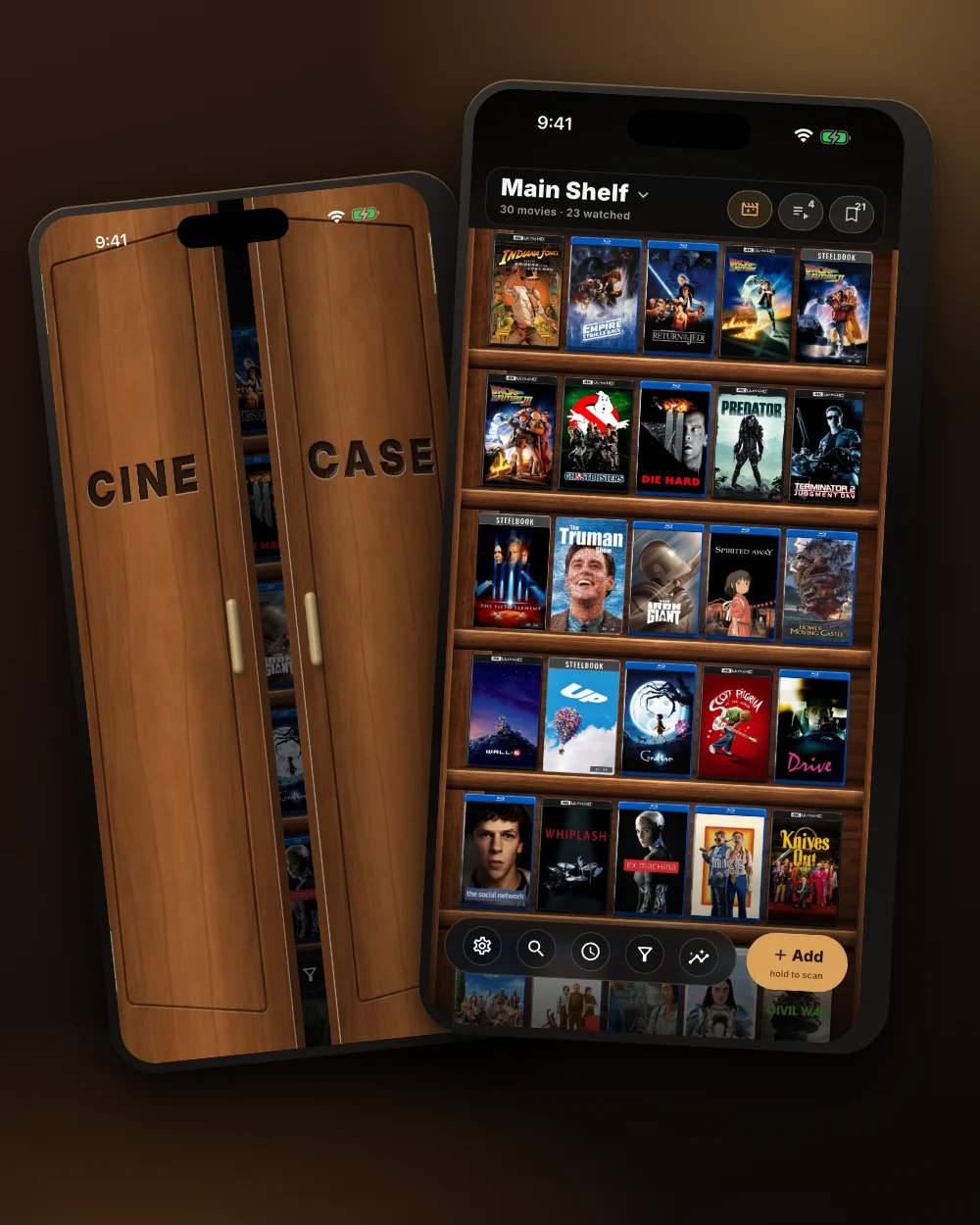
A home for the films you own. Browse real cases, keep your box sets together, and find tonight's movie on your own shelf.

Moving from DVD Profiler?Import DVD Profiler XML for free

Free core. Free imports and exports. Optional lifetime Pro.

Take a look inside

Make yourself at home.

Skip to importing

01 / YOUR SHELF

Looks like the
collection you love.

Cases, cover art, and the order that makes sense to you. Keep combo packs as one shelf item and switch between covers and spines.

Your main shelf and Collections are free. Extra libraries are part of Pro.

Next: open a Collection
Cinecase's Covers view with a personal movie collection
Actual Cinecase app screen

02 / THE FILMS INSIDE

One box.
A whole world inside.

Open a Collection to see the films it holds. Keep trilogies, franchises, and box sets together without losing the individual movies.

Movie Night can choose individual films inside Collections, too.

Next: get the bigger picture
The Lord of the Rings Trilogy Collection open, showing its three films
Actual Cinecase app screen

03 / YOUR COLLECTION, IN FOCUS

Know your shelf.

See your collection from a new angle. Explore your formats, genres, decades, and watch history.

Your collection, at a glance.

Next: find your next watch
Cinecase statistics showing collection totals and movie formats
Actual Cinecase app screen

04 / MOVIE NIGHT

Find your
next watch.

When you can't decide, Movie Night picks from the films you own. Start with unwatched films or narrow the choice by genre, runtime, actor, or director.

Found a keeper? Add the pick to Up Next.

Next: keep your watch queue
Movie Night revealing The Nice Guys as tonight's pick, with an Add to Up Next button
Actual Cinecase app screen

05 / UP NEXT

Keep track of what
you watch next.

Keep the films you want to watch in one queue. Arrange them in your own order, see the total runtime, and mark them watched as you go.

Your next movie is ready when you are.

Bring your collection over
Up Next showing a five-film watch queue with total runtime, watched controls and reorder handles
Actual Cinecase app screen

A fresh start. A familiar collection.

Moving from
DVD Profiler?

You've already done the cataloging.
Bring it with you.

Import DVD Profiler XML into Cinecase for free. Get your titles onto your phone without rescanning every disc.

Get Cinecase free

Available on Android and iPhone.

01

Export your collection.

Save an XML export from DVD Profiler and transfer the file to your phone. Keep your original export as a backup.

DVD Profiler · .xml
02

Choose it in Cinecase.

Open Settings → Your data → Import from another app, then select your XML file.

Import happens in the app. No need to upload your collection to this website.

03

Review. Import. Settle in.

Check the preview and its duplicate or skipped-row counts before you confirm. Your supported box sets come with their films.

See what transfers

Before you move

What carries over from DVD Profiler?

Supported fields include titles, production years, formats, editions, and retail barcodes. Supported multi-film box-set relationships become Collections with films inside.

Not every DVD Profiler field transfers. Special features and Easter eggs are not imported. Nested box sets and single-child profiles are not grouped the same way. Keep your original export and review the import preview before confirming.

Do I need Pro to import?

No. Imports and exports are free. The core collection experience stays free, with an optional one-time Pro purchase for extras such as batch scanning, extra libraries, and Google Drive sync.

Coming from a different app?

Cinecase also accepts CLZ XML or CSV, My Movies CSV, Letterboxd watched CSV, and generic CSV. The import preview helps you check what Cinecase recognized before adding it.

Export support and fields vary by app. Letterboxd import is for watched films, not a watchlist or full diary transfer.

Can I take my collection with me later?

Yes. Backup and export remain free, so you can keep a copy of your data. No account is required for the basic local shelf.

Made for physical media

The details collectors actually care about.

MOVIE NIGHT

Let your shelf decide

Start with unwatched films, narrow the choice, and reveal one equal-odds pick. Films inside Collections stay individually eligible.

01

Scan or add manually

Use a barcode when it works, or search by title when a j-card or code is missing.

02

Movies and TV

Track films, series, seasons, multi-season cases, complete series, and limited series.

03

Your artwork

Use custom covers for individual releases, Steelbooks, slipcovers, and Collections.

04

Flexible libraries

Keep your main shelf free, then use Pro for extra libraries and moving titles between rooms, formats, or categories. Sort automatically or drag cases yourself.

05

Watch and find

Track history, ratings, favourites, notes, and loans. Search titles, actors, and directors.

06

Private by default

No account is required for the basic shelf. No ads and no third-party tracking.

A real free app, not a trial

The shelf stays useful without a subscription.

The core collection experience, imports, and exports are free forever. Sign in only when you choose an account-based feature. Your collection remains local unless you enable Google Drive sync.

Optional lifetime Pro
  • One purchase, not a recurring bill
  • Batch scanning
  • Extra libraries and moving titles between them
  • Nine more shelf themes: Oak, Pine, Black Ash, Brushed Metal, Glass, Marble, Retro Video Store, The Cinephile, and The Closet
  • Genre views
  • Google Drive sync and restore
  • Duplicate cleanup
  • Localized price shown by your app store
  • Your free collection is never held hostage

Your collection's next chapter

Bring the shelf.
Find tonight's movie.

Start free. Import free. Make yourself at home.

Read the migration guide ↑